
Share Links with Context in One Click
Overview
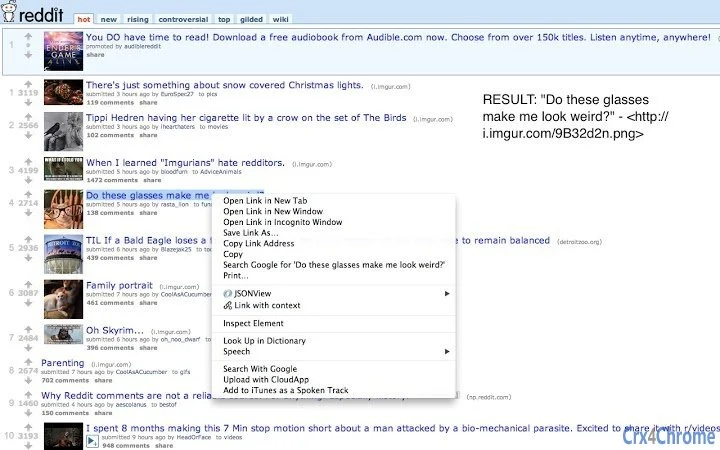
Link With Context is a productivity-focused desktop application designed to enrich the way users share links across platforms. By embedding relevant context directly into copied links, it ensures recipients understand the relevance and background of the content being shared. This is particularly valuable in online communities such as Reddit, where standalone links often lack clarity without the accompanying title or description.
The software operates seamlessly within web browsers, allowing users to copy links or highlighted text with embedded context in a single action. When a link is copied, the tool appends the title or description in a standardized format, making it easier to communicate intent. This functionality supports both direct link copying and text highlighting, offering flexibility for various use cases.
Target users include content curators, online community contributors, and professionals who frequently share web content across messaging platforms and forums. The tool is especially beneficial for those who want to improve clarity in digital communication without requiring additional steps or external tools.
While the developer has not provided additional background, the application's focus on simplicity and utility suggests a targeted approach to solving a common digital friction point. Real-world usage includes sharing Reddit threads, blog articles, or research resources where context significantly enhances comprehension.
Key Features & Capabilities
- Context-Aware Link Copying – Automatically captures the title or description of a link when copied, ensuring the shared content includes essential context. Ideal for platforms like Reddit where titles provide critical insight.
- Text Highlight Integration – Allows users to highlight any portion of a webpage and copy it with embedded context. This works even when the entire page is selected, making it adaptable to diverse workflows.
- Standardized Output Format – Copies content in the format:
"text of link" -, ensuring consistency across shared links and improving readability. - Text Limit Protection – Limits copied content to the first 7,500 characters to maintain performance and prevent excessive data transfer.
- One-Click Sharing – Eliminates the need for manual copy-paste of titles and links, streamlining the sharing process across messaging apps, forums, and email.
These features are particularly useful in collaborative environments where clarity is essential. For example, a user sharing a research article can copy the link with the article’s title, ensuring the recipient understands the subject matter immediately. Similarly, in online discussions, users can highlight key excerpts from a webpage and share them with full context, reducing confusion and improving engagement.
User Interface, Workflow & Performance
The user interface of Link With Context is minimal and focused on functionality. It operates as a background extension within the browser, requiring no complex setup or navigation. Users interact with it through a simple context menu or keyboard shortcut, depending on the browser’s implementation.
Workflow efficiency is high, as the tool eliminates the need to manually extract titles or descriptions before sharing. After installation, users can copy a link or highlight text and paste it directly into any platform, with the context automatically preserved.
Performance details were not specified by the developer. However, based on the application’s lightweight design and 2.3 MB file size, it is expected to have minimal impact on system resources. The developer did not specify resource usage details, and no performance benchmarks were provided. Stability appears to be maintained through standard browser extension architecture, though users should refresh open tabs after installation for full functionality.
Compatibility & System Requirements
Link With Context is compatible with Windows, Mac, and Linux operating systems, making it accessible across major desktop platforms. It functions as a browser extension, meaning it relies on the host browser’s environment for execution.
The application has a file size of 2.3 MB, which is relatively small and indicates a lightweight footprint. This suggests efficient resource management and quick installation times.
Exact system requirements were not listed. The developer did not provide additional information about hardware specifications, processor speed, or memory needs. Compatibility information is limited to the supported operating systems.
Pros and Cons
Pros
- Enhances link sharing with automatic context embedding
- Works seamlessly across Windows, Mac, and Linux
- Simple, one-click operation with minimal learning curve
- Supports both link and text highlighting modes
- Free to use with no hidden costs
Cons
- No visible UI or settings panel to customize behavior
- Text limit of 7,500 characters may restrict long excerpts
- Requires tab refresh after installation to function
- Dependent on browser extension ecosystem
- Limited to web-based content sharing
FAQ Section
Is Link With Context available for all major browsers?
Link With Context is designed to work with browsers that support extensions on Windows, Mac, and Linux. Specific browser compatibility may vary based on the extension’s distribution channel.
Is the software safe to use?
As a desktop application that operates within the browser environment, Link With Context does not access or store user data beyond what is necessary for link copying. It is free and open to use, with no known security risks reported.
How often does the software update?
Updates are released by the developer as needed to maintain compatibility with browsers and fix issues. The latest version is 1.0.0, released on April 15, 2024.
Does it require an internet connection to work?
Link With Context functions primarily when connected to the internet, as it relies on the browser to access web content. However, once a link or highlighted text is copied, it can be used offline.
Can I use it without creating an account?
Yes. Link With Context does not require registration or account creation. It operates entirely offline after installation and can be used immediately.
Final Thoughts + CTA
Link With Context delivers a focused, practical solution for users who value clarity in digital communication. Its ability to embed context directly into shared links eliminates a common source of confusion in online interactions. While it lacks advanced customization options, its simplicity and reliability make it ideal for everyday use.
Professionals, content creators, and community contributors will benefit most from its streamlined workflow and cross-platform availability. The tool’s free pricing model further enhances its accessibility.
For anyone looking to improve the quality of their link sharing—especially on platforms like Reddit or in collaborative workspaces—this tool offers a meaningful upgrade without complexity.
Download Link With Context now







